


Remapping the Keyboard in DataVolley

Changing the Remapping
I recently read how Joe Trinsey, former USA Women Scout, and Jeff Liu, current USA Women Scout, remaps their keyboard. They have both hands on the keyboard (which was a disaster when I tried it) so not everything applied to me. However, it did give me some ideas of how to change some of my keyboard remapping.
Constraints
When I am coding in DataVolley, my left fingers are rested on the Shift, A, S and V keys and my right fingers resting on the number pad of 4, 5 and 6 (see photo below). This makes it easier to code shirt numbers and court zones. A major disadvantage of placing your fingers in this way is the right side of the keyboard is essentially unavailable to you. Since you can’t touch type any of those letters, you have to physically look at the keyboard if you want to key in any of those letters. That couple of seconds of looking at the computer may mean you miss out on seeing critical actions (and subsequently not coding them) or even worst, miss out on the rally ending action, i.e.. who won the point. One example is the P letter on the right side of the keyboard. It denotes if the attack was a soft/ roll attack and PP is the default attack combination code for setter attack. You can work around this by remapping the keyboard. This means if I press the B key, it would actually come out as P (soft attacks). This is actually what I did. Since B is a code used for blocking, I remapped the L key to be the B code.

Changing the Outcome Codes to One Side
Joe and Jeff had their outcome codes, i.e. perfect (#), neutral (!), negative (–), overpass (/) on the right side of the keyboard. Mine were all over the place. Since I first started using DataVolley, I used the Z key to produce # and X key to produce –. When I started to code overpasses, I use the actual / key above the number pad. When I started to code !, I would actually press SHIFT+1 to get the !. However, I realised I could have those outcome codes by the number pad. The / is still the /. Now, the ! is the * key, # is the + key and – is – key (no remapping needed there).

Available Z and X Key
Since I remapped the # and – codes to the number pad, I freed up the Z and X keys. I decided that I would remapped the Z key to to produce the P code (soft attacks). I originally remapped the P code to the B key but now I’ve released the B key to its original B code (blocking). It has been pretty useful having the P code so close because I use it often in beach volleyball.
I used the X key as an attack combination code. This will be future blog post (see link).

Remapping the End Rally Left and End Rally Right Codes
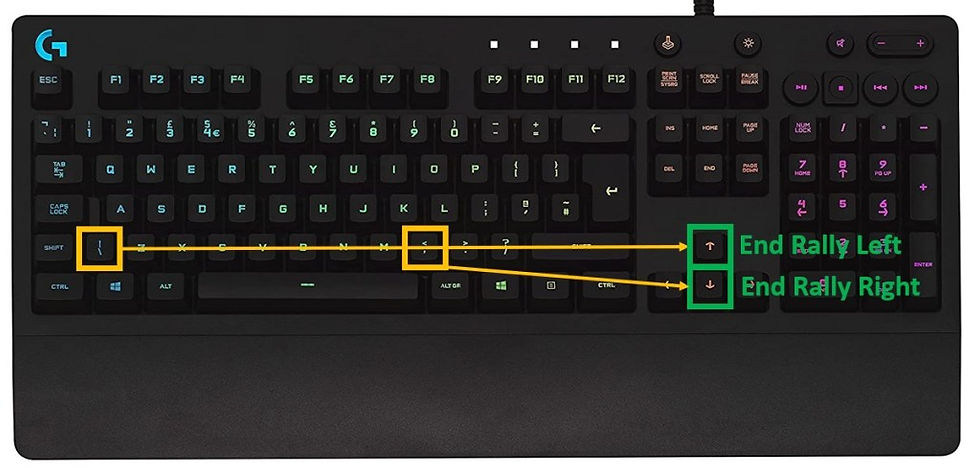
Joe and Jeff actually remapped their keyboards so the End Rally Left was the ArrowUp key and the End Rally Right was the ArrowDown key. I adopted this when I was trialing using both hands on the keyboard (see link) and I liked it. It corresponded to how the court was when statting on the end line.
Scout Extension Shortcut Key
Joe and Jeff used the W key to open the scout extension window, e.g. if the service errors were long, left, right, or net. The CTRL+SPACE is generally the shortcut key to open this up but I liked that you can just use one key for it. I used it when trialing out coding with both hands on the keyboard and I adopted it since.
The Error (=) Code
You only code the = code at the end of the rally, which means you can look at your keyboard because the rally has ended. However, I still didn’t like the fact I still had to look at my keyboard. I just wanted to be able to touch type everything. There could be something else you missed if you look at your keyboard, e.g. the second ref calling for a net touch on the block. Since I just freed up the / key, I decided I could use that for the = code. I like it better this way. However, I do occasionally mix up the \ and Z keys when I’m coding but I am getting better with practice. The original = key is still used for the = code because the DeleteBack key is next to it. This is usually used for service errors when I have already started to type in who received the ball.

Final Thoughts
When you look at the actual Keyboard Remapping Table (see below), it doesn’t seem like much but it is a massive change for me. I have coded a few matches with this and I like it. I would still like to have the M code (to indicate jump float serves) and the K code (setter calls) available but it is not essential right now.


Comments