


Recycle Bin tab in Lightning Experience

Hi and welcome! 😀
In this article, we shall learn about an easy fix to directly access recycle bin in Lightning without having to switch to Classic UI and create a tab for the same, for ease of accessibility.
Let’s roll!
We start off by creating a ‘Web’ tab.
Step 1:
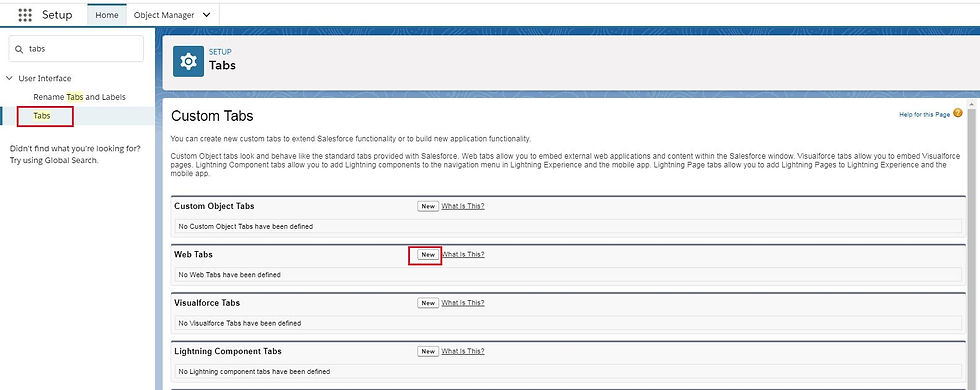
Go to Setup, and search for ‘Tabs’.
Click on ‘Tabs’.
Click ‘New’ under ‘Web Tabs’ section.
Click ‘Next’.
Give your tab a name, for example, Recycle Bin.
Choose any Tab style, and leave the Content Frame height as it is and click ‘Next’.
1.
2.

3.

Step 2: Under “Button or Link URL” section, enter the following URL:
/search/UndeletePage

Click ‘Next’.
Add the tab to the desired profiles and click ‘Next’.
Add the tab to the desired apps and click ‘Save’.
And voila!
Now, switch back to any of the app to which the tab has been assigned and find the ‘Recycle Bin’ tab in the Navigation bar.
Demo:


Comments