


My Attack Combination Codes on DataVolley

Introduction
Attack combination codes in DataVolley are particular codes that enable specific attack types to be scouted quicker and more accurately. They are made up with two alphanumeric characters. The first character usually denotes the type of attack from what kind of set and the second character usually denotes the attack origin zone, i.e. where the attack started from. Together, they give you the specific attack type.
There isn’t a lot out there in terms of how different scouts modify their attack combination codes (I mean, how many people in the world actually use DataVolley?) So I thought I’ll give out my attack combination codes that I used this season (2017/18) and some reasoning on why I use certain codes/ keys.
Statistician’s Note
When I first started using DataVolley, Matt Bianco (former GB Women’s Scout) gave me his attack combination codes for me to use so lot of credit goes to him. I have since adapted it to use my own use.
The Conundrum
When I stat in DataVolley, my left hand rests on the left hand side of the keyboard (“SHIFT”, “A”, “S” and “V” buttons) and the right hand rests on the number pad (“4”, “5” and “.” buttons), as seen below.

So if there are any codes that are on the right side of the keyboard, I physically have to look at the keyboard to find it if I wanted to code it. This is a problem because as I look down, I could miss out on critical actions (and their corresponding stats) and it usually takes me a second to get back on track. The solution is fit all codes within reach of the left hand so I able to stat everything without ever looking at the keyboard during the rally so I don’t miss any action/ stats (whether this happens is another matter). The conundrum is then how to fit everything on the left side of the keyboard.
Attack Type
Well, there are 16 keys within reach of the left hand. Nine of them are already assigned by DataVolley, as seen below. “Q” – Quick “E” – sEt “R” – Reception “T” – Tip attack “A” – Away team “S” – Serve “D” – Dig “F” – Freeball “B” – Block
There are three other keys that I have assigned myself using keyboard remapping, as seen below. “\” – end rally left team (point to the left team) “Z” – negative (“-“) quality action “X” – double positive (“#”) quality action
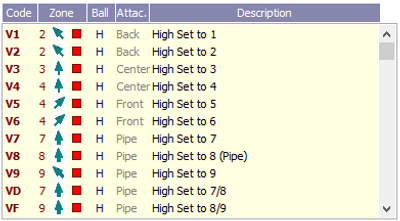
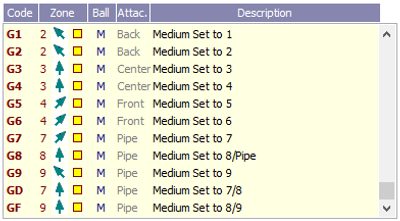
This means there are only four free keys to assign the attack combination codes. However, there are six attack types that I want to code: attacks from high sets, attacks from medium tempo sets and the four middle attacks of one, shoot, C and slides. Below is what I landed on: “V” – attacks from high/ slow tempo sets “G” – attacks from faster/ medium tempo sets. “W” – quick attack sets near the setter. Includes A/ One and C/ reverse quick attacks depending on attack origin zone. “C” – quick attack sets away from the setter. Includes B/ shoot and D/ slide attacks depending on attack origin zone.
Attack Origin Zone
The second alphanumeric character usually denotes the attack origin zones. You can see below how split up the attack origin zones. I’ve split up the front row into six zones (1-6). Zone 0 is the same as zone 3 but is a back/ reverse set version. The back row is split up into three zones (7-9). There is also D and F zones, which denotes a set between 7/8 and 8/9, respectively.

Attack Combination Code List
So together with the attack types codes and attack origin zone codes, you get the specific attack combination codes. Below is the full list that I used.


Limitations
There are a few limitations to this attack combination list. The first is I can’t code A/ One attacks to zone 2 or 1 or code C/ reverse quick attacks to zone 4, 5 or 6. It’s not ideal but I overcome this by coding them as “W3” and “W0”, respectively.
I also can’t do real attack directions for first (“VV”) or second touch (“VC”) attacks. You can code the attack destination zone (where it landed) but you can’t change the origin zone. The designated attack origin zone for “VV” and “VC” is zone 2 and 3, respectively. So a player may attack from an overpass in zone 4 (“VC”) but if I code the attack destination zone, the attack directions stats will show it came from zone 3. So while it may be nice to know the tendencies of these type of attacks, I can live without it.
Since I ran out of unassigned keys within reach of my left hand, I left out cross-over attacks. I justified leaving it out because this type of attack is rarely used in the Super 8s. If a cross-over attack did happen, I would code it as a “G” attack.
Future Modifications
For example, I rarely use the “E” (setting), “B” (blocking) and “R” (reception) key and only if there was an error. This means I can shift those codes to the right hand side of the keyboard using keyboard remapping. Since these are point ending actions, I can afford to look at the right hand side of the keyboard for those keys because there are no more stats to take. This would free up valuable keys for other codes, such as cross-over attacks. I could also separate A/ One quick attacks and C/ reverse quick attacks using two separate codes rather than using “W” for both. When I came up with this current list, I only thought about the keys within reach of the left hand. However, I didn’t even think about keys within reach of the right hand. I only recently realised that there was another “/” key above the numberpad. Because of this, I now code reception attempts that result in an overpass. There are also two keys above the numberpad that I could potentially use: a “-” key could be used for negative actions and the “*” key I could use for double positive actions (“#”). This would free up the “Z” and “X” keys that I use currently for these codes. I already do this for “VD” and VF” so why not continue with it. For example, I could do the following, which will enable me to do first touch/ overpass attack directions: VC – first touch/ overpass attacks from left side VV – first touch/ overpass attacks from middle VB – first touch/ overpass attacks from right side
Final Thoughts
I was happy with the attack combination codes I had and I was comfortable with the limitations that came with it. However, since writing the Future Modifications section, my brain was racing with the many different possibilities to get coding really efficient. It is also not just with the attack combinations but with all codes, such as moving the annoying “P” code (roll attack) to the left side. I could also move setter calls (it starts with a “K” code) to the left side when I eventually learn to incorporate it into my scouts. The thing to do now is to work it all out so everything is efficient and logical, make sure it all works, practice enough so it coding becomes automatic and then go ahead with the arduous task of editing the worksheets, print compositions and charts to reflect the code changes.

Comments