


Hyper Mobile USB4 Dock Review & Teardown

[Need a new desktop-class dock? See 50+ Thunderbolt/USB4 docks compared]
[updated 5/31/2022 with clarifications from a ViaLabs representative on the VL830 chipset]
Intro
Today’s teardown is of a new mobile hub/dock from Hyper/Sanho Corporation [Amazon affiliate link]. The Hyper brand has a mixed reputation with several Kickstarter campaigns making odd product claims and shipping to customers late with poor communication. But the company has worked hard during the last 2 years to regain customer trust. And last year, Targus, which has a good reputation as a business-oriented brand, bought Hyper/Sanho to add more consumer products to their portfolio. With this latest hub, I’m afraid to say that slightly misleading product claims have returned. This doesn’t mean it’s a bad product, just that the marketing doesn’t quite match what the product does. Let’s dive in.
Full disclosure: While this is not a sponsored post, one of the products showcased (the PSU) was provided at no cost for evaluation purposes. (The featured product was purchased.) Products received in this capacity are destined for teardowns, future device interoperability testing, and/or charitable donations.
Product specs
HOST connection: USB4 (40Gbps; 85W PD passthrough charging)
HDMI 2.1 (8K 30Hz; HDR)
DisplayPort 1.4 (8K 30Hz; HDR)
2x 4K60 max for dual monitors
USB-C (10Gbps data or 100W PD input)
2x USB-A (10Gbps; 4.5W)
1Gbps Ethernet
3.5mm TRRS Audio Combo Jack (96kHz/24-bit)
integrated 30cm USB-C cable
Unboxing & Physical Characteristics


Power testing
The hub claims to accept 100W PD and distribute up to 85W to the laptop. Let’s test that.
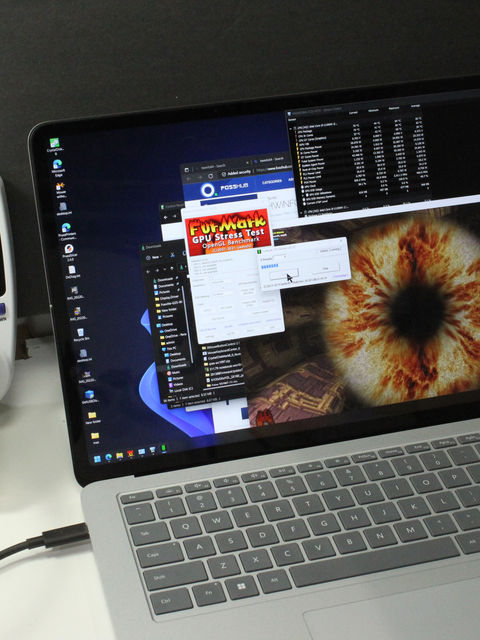

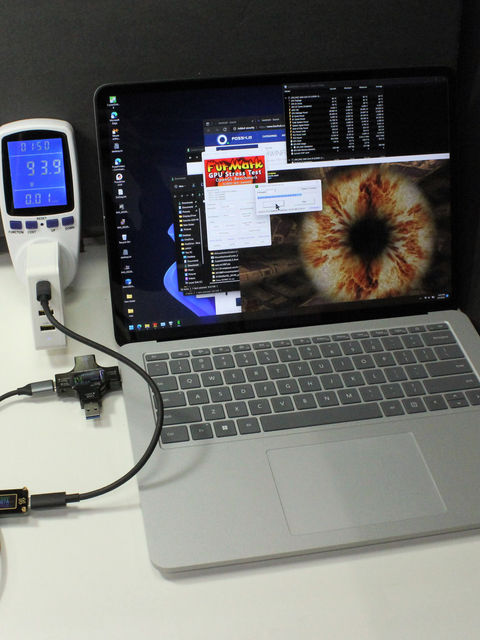


I re-tested with a 60W PSU and confirmed that the maximum power delivered to the laptop never exceeded 45W – so 15W is being properly reserved by the hub as expected.
Feature testing
Both of the USB A ports worked fine at 5Gb/s. I don’t have 10Gb/s devices so I’ll just trust Hyper’s claim on that. I was unable to get the USB-C port working for data with either USB 2.0 or 3.x devices – it only seemed to work for accepting or delivering power. There is a 10Gb/s logo right next to the port and PCB data traces going to the port (see teardown section), so my unit must be defective.
Ethernet is Realtek 8513 (USB\VID_0BDA&PID_8153) and audio is by Solid State System Co (USB\VID_0C76&PID_1700). I had never heard of this company but after digging, I found that JMTek (based 30km from my house) uses these chips in inexpensive USB headphone adapters and speakers. Curiously, the audio chip is only enumerated after headphones are plugged in and promptly disappears when the headphones are unplugged. Once enumerated, it registers 24-bit/48KHz capabilities, not 24-bit/96KHz as Hyper claims. For a low-end chip, the sample rate makes zero difference and is simply a marketing gimmick.
Using monitor simulator dongles, I was able to confirm 4K30+4K60/YUV420. I don’t have two 4K60 monitors to properly test the full bandwidth case and I was not able to test advanced HDMI 2.1 features like variable refresh rate since I don’t have a monitor capable of this.
Todo: double-check monitor capabilities including HDMI 2.1 VRR and full bandwidth 2x 4K60/8bpc/YUV444 modes
Lesser Functionality on older USB-C laptops
In order to get 8K30 or 2x 4K60, your laptop either needs to be USB4/TB4 compliant or perhaps a recent USB-C 3.2 Gen2 model that can output DisplayPort 1.4 (DP 1.4) multi stream transport (MST) with display stream compression (DSC) enabled (a feature combination limited to Intel 11th gen Core i5 and AMD 2nd Gen Ryzen 5 and later). (Most laptops with NVIDIA GPUs use the Intel chip for video output.) Older laptops can only do MST or DSC, not both at the same time. For example, the Surface Pro 7 is limited to 1x 4K60 or 2x 4K30 via USB-C hubs while the Surface Pro7+ is capable of 2x 4K60. Even older laptops with DP 1.2 are limited to 1x 4K30 or 2x 1080p with the Hyper.
Teardown


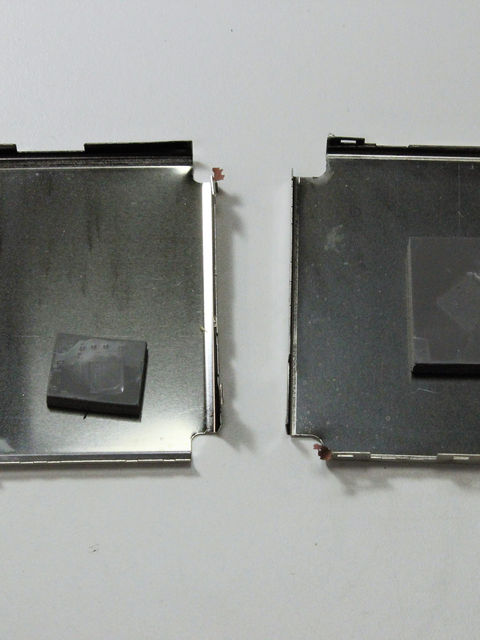

no-name 25F048 4Mb flash ram
second no-name 4Mb flash ram
power filtering, switching, and DC-DC converters
hand soldered cable topped with clear glue

4 individual Ethernet transformers covered in clear glue
MPNX 9247898 power controller?
various mosfets, power filtering, and ESD protection
Analysis
The marketing material for the VL830 indicates USB-C->DP decoding is included, and is indeed directly connected to the VMM6210 MST chip. According to Via, the companion VL105 chip handles PD functions and a subset of DP functionality including aux/sideband channels for hot-plug detection, EDID, etc. It would be interesting if Via made a single-chip solution that combined hub, MST splitter, and PD functions to simplify these hubs. But that level of integration might require a hefty heastink.
All ports appear to have filtering and ESD protection with 6-pin TVS devices adjacent to the USB A ports.


Topology
Upstream USB-C plug
Via Labs VL830 5-port hub with DP 1.4
Synaptics VMM6210 MST splitter
HDMI 2.1 receptacle
DP 1.4 receptacle
USB 3.2 Gen2 receptacle #1
USB 3.2 Gen2 receptacle #2
USB-C receptacle
quad transformers
RJ45 receptacle
Solid State System Co 170081-QCC USB 2.0 audio chipset
3.5mm trrs combo audio jack
Is it really USB4?
According to the official USB-IF spec:
A USB4 hub contains:• A Device Router.• An Enhanced SuperSpeed USB Hub.• A PCIe Switch.• A USB 2.0 Hub.A USB4 hub supports 20G USB4 operation (Gen2x2) and 40G USB4 operation (Gen3x2).A USB4 hub is required to support DisplayPort Alt Mode on all of its DFP. See the USB Type-CSpecification for a full definition of the requirements and details regarding DisplayPort Alt Modesupport on a DFP.
A USB4-based dock product combines a USB4 hub (including at least one exposed USB Type-C downstream port) with additional capabilities that either exposes other connector types and/or includes other user-visible functions, e.g. storage, networking, etc. Example of functions that are not considered user-visible include firmware update or device authentication.”


All of the above implies that a true “USB4 hub” or “USB4 dock” needs to have at least one downstream USB4 port that can operate at 20Gb/s or 40Gb/s and that port should also do DP video, PCIe, and Thunderbolt. The other downstream ports can be anything – 10Gb/s, 5Gb/s, or even 480Mb/s. Since the Hyper’s ports max out at 10Gb/s, maybe it would be more accurate to describe it as a highly capable USB 3.2 Gen2 hub/dock rather than a USB4 dock.
So why is USB4 mentioned?
Before the teardown, I searched for clues with BusHound and USBDeview, to gather details about the hub chipset. Its a Via Labs VL830 (USB\VID_2109&PID_0830 with PID_8830, PID_2830, and PID_0105 enumerated as billboard devices for firmware updates, posting error messages to the user, and a USB2.0 hub respectively). On my USB4 Window laptop, this chip is recognized as a generic superspeed hub just like it is on a USB3 laptop. I also found that the VL830 is USB-IF certified as USB 3.2 compliant.


I also used the Synaptics VMMDPtool, to dump the device firmware details and found a VMM6210 MST chip with HDMI 2.1 + DP 1.4 transmitters. Per Synaptic’s specs, DSC 1.2a decoding can be done on-chip. This chip is capable of 8K60, but in this hub, Hyper only claims 8K30.
In the teardown, we can see 4 lanes connecting the VL830 to the VMM6210 and 4 lanes output to each HDMI and DP. Most hubs with 5Gb/s or 10Gb/s USB ports with similar VMM chipsets, are setup in multi-function hub mode (DP Alt Mode pin assignments C and E) where 2 lanes are dedicated to the MST chip and 2 lanes to the the USB data hub. In such a scheme, bandwidth is limited and 2x 4K60 relies on display stream compression (DSC) which isn’t supported on all laptops. For laptops without DSC, you can only do 2x 4K30 on such hubs.
VMM6210 Firmware info:
EDID information Product ID: XMD009A Serial No: 00000000 CHIP ID: VMM6210 CHIP version: B0 Manufacture date: 9th week of the year 2021 Firmware name: *re_usb4_gp6210 Firmware version: 6.04.112 Configuration file version: 048 Bootloader version: 001 Bootstrap setting: 0x08 Active flash bank: 1 JTAG loading: Disabled Service mode: Service mode Load speed: 50 Mbps MCU speed: 300MHz Firmware image load result: 0x1f, error code: 00 Firmware code loading OK Configuration block0 loading OK Configuration block1 loading OK HDCP 1.4 key check OK HDCP 2.2 key check OK
Digging a little deeper, I noticed different behavior of the VMM chip when connected to different laptops.
VMM6210 config info when connected to USB4/TB4 laptop (Surface Laptop Studio)
RX: MST 4lane
HBR3 mode, EFM disabled, Lock sts: 0010000 Symbol error recently: 8000 8000 8000 8000, in 1s: 8000 8000 8000 8000 ... TX0: HPD ON, HDMI output, output enabled 3840x2160@59.99Hz YUV420 8bpc, pixel clock: 593.9.5MHz, Audio enabled ... TX1: 4lane HBR mode, EFM enabled, SSC disabled, output enabled 3840x2160@29.99Hz RGB 8bpc, pixel clock: 296.9MHz, Audio enabled
VMM6210 config info when connected to USB3.x laptop (Surface Book 2)
RX: MST 2lane
HBR2 mode, EFM disabled, Lock sts: 00100030 Symbol error recently: 8000 8000 0000 0000, in 1s: 8000 8000 0000 0000 ... TX0: HPD ON, HDMI output, output enabled 1440x288@0.00Hz RGB 8bpc, pixel clock: 0.0MHz, Audio disabled ... TX1: 4lane HBR mode, EFM enabled, SSC disabled, output enabled 3840x2160@29.96Hz RGB 8bpc, pixel clock: 296.6MHz, Audio enabled
The only mechanism to enable DP 4-lane mode while preserving USB 3.x 10Gb/s data is that the VL830 chip does include a USB4 device router as advertised.
So when connected to a USB4 host, DP tunneling is used and overall bandwidth is dynamically adjusted between the USB hub side and the DisplayPort side. When an older laptop is used, the VL830 falls back into a multifunction hub DP alt mode where 2 lanes are routed to the USB hub and 2 lanes to DP. This leads to the following predicted performance:
Hyper does make a bold claim of “40Gbps” and “4X more bandwidth” on the box. Does this mean that if you connect multiple 10Gb/s devices, the bandwidth is aggregated i.e. run in parallel up to the host PC? No. Just like any other USB 3.2 Gen2 hub, all the bandwidth is shared between the downstream USB ports. So if several 10Gb/s devices are attached, the combined data bandwidth to the host is still 10GB/s. (To prove this, I’d need to connect several speedy external SSDs and run long file transfers in parallel.) This is the same way most Thunderbolt Docks work where only the dedicated Thunderbolt ports can do 40Gb/s data and the regular USB ports are limited to sharing 10Gb/s between them.
So I think Hyper is conflating the DisplayPort alt-mode video bandwidth (~32Gb/s) with the full-duplex USB data bandwidth (10Gb/s) and adding them up to 40Gb/s for marketing purposes. To be clear, the 40Gb/s claim is valid but it is also misleading when surrounded by marketing fluff. To drive the point home, consider the USB 3.2 hub case where 2 lanes offer 10Gb/s for USB data and the other 2 lanes offer 16Gb/s DisplayPort video. Should these be marketed as 26Gb/s hubs?
Update – ViaLabs reached out to clarify VL830 chipset details
“…The reason BusHound/USBView/device manager shows VL830 as a USB 3.2 Hub and not explicitly as a USB4 device is because of the way USB4 works (and how Thunderbolt has been implemented on PC.) If you plugged VL830 into an Apple silicon Mac running at least MacOS 12.1, it would clearly show that VL830 runs in USB4 mode…
VL830 is USB 3.2 certified because USB has a nice property of backwards compatibility. When we’re not connected to a platform that supports USB4 eg. a USB 3.2 or even USB2 only platform, our USB functions must work. (USB4 certification isn’t open to the rest of the industry yet; also, USB 3.2 certification is a pre-requisite to USB4 certification, although its up to individual companies to list these pre-requisite certifications or not.)
We purposely did not support USB4 downstream ports because you could just buy an Intel JHL8440; we figured that consumers would benefit from having a choice to get double the display bandwidth (compared to DisplayPort Alternate Mode) and SuperSpeed USB 10Gbps without needing to jump on the Thunderbolt band wagon.”
– Terrance @ ViaLabs via email to dancharblog
Conclusion
Except for the integrated cable, I like the construction of the Hyper. The chassis is simple, EMI shielding is well done, and the PCB makes efficient use of space. Aside from the non-functioning USB-C data port on my specimen, all features worked well. Being able to drive 2x 4K60 monitors while keeping USB data speeds at 10Gb/s without using DisplayLink is unique in this price class. Unfortunately, marketing makes a few slightly misleading claims:
USB4 – I guess this is OK. But I’d still argue that it is more similar to a highly-capable USB 3.2 Gen2 hub since data ports are limited to 10Gb/s.
40Gb/s & 4X faster – Not really – its only 10Gb/s data and 2x 4K60 video. Instead, Hyper should focus on the killer feature this hub offers: “Run 2x 4K60 or 1x 8K30 monitors without sacrificing 10Gb/s USB data speeds“.
24-bit/96KHz audio – Its actually 24-bit/48KHz, but it doesn’t really matter with a budget audio chip and 16-bit/44.1KHz would be OK. I don’t think anybody expects studio quality sound here so perhaps its better if Hyper left out this detail.
To be clear, none of this detracts from the great performance of this hub.
When marketing a highly capable USB-C hub, it is confusing to showcase the different capabilities when connected to different laptop generations. By stating USB4, it is implied that customers will get full functionality on USB4/TB4 laptops, and any lesser laptop might not yield the top performance. USB 3.2 Gen2 laptops like the Surface Pro7+ and others from late 2020 and 2021 may work with all advertised features while less cable laptops will be limited to 1x 4K60 or 2x 4K30 monitors. So it’s a confusing mess to market these products. Hyper may be just trying to limit returns and product support calls by marketing towards newer USB4/TB4 laptops where all features are guaranteed to work. If that is the case, it’s a good business choice, but they could spell it out a little better.
At the $139 retail price, the Hyper hub is a little expensive considering the limited number of ports, but pricing for tech has been all over the map in recent months. At the discounted price of $112 (with 20% coupon code) it is quite reasonable. If you need a compact hub with reliable 2x 4K60 and prefer not to use DisplayLink, it’s the only option available right now, and for that alone, it is worth considering.
Similar products to consider are the Cable Matters 201331 (USB 3.x 5Gb/s, no audio, but with 3x DisplayPort for 3x 1440p60 or 2x 4K60) and the Cable Matters 201355 (USB 2.0, no audio, and 2x DisplayPort for 2x 4K60). But each of these hubs has its own set of issues with the former only doing 2x 4K60 on select laptops and the latter limiting USB speeds to 480Mb/s. XFanic has two desktop-class docks based on the VL830 that actually do 3x4K60, but two of the Display outputs are run via DisplayLink so aren’t suitable for demanding graphics. For modern USB4/TB4 laptops, the Hyper ought to work better than the other options and cost considerably less than a Thunderbolt 4 dock.
References & additional reading
Special thanks to Leaves for some of the PCB insights.

Comments