

Flow Screen Component: Picklist values based on selected RecordType

Hello and welcome! 😀
This article is in succession to my previous article, Flow Screen Component: Dependent picklists based on RecordType selection, where I created a lightning component for flows which renders dependent picklist values based on the selected record type. So in this article we will be creating a custom lightning component for flows, which renders picklist values based on the selected record type.
Why create this component?
At present, we do not have any out of the box feature in flows which can help us show picklist values based on a selected record type. Hence, a custom component to add to the arsenal of our fellow #AwesomeAdmins.
Setting up elements in the org for our use case for demo
For demonstration purpose, I have created a picklist field, Session Category(Session_Category__c) And two record types, namely: -Admin -Developer
Next, I set up the the picklist values for each of the record type as shown.

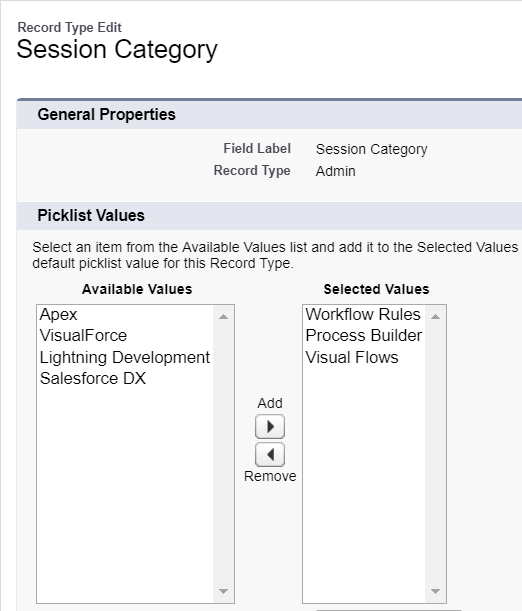
Now we are all set to start creating our custom lightning component for flows.
CODE:
Picklist_RecordTypeController.apxc:
public class Picklist_RecordTypeController { //Wrapper class to return the recordtype object to component public class recordTypeWrapper{ @AuraEnabled public string rtName{get;set;} @AuraEnabled public string rtId{get;set;} @AuraEnabled public boolean rtIsMaster{get;set;} @AuraEnabled public boolean incorrectApiName{get;set;} } //Wrapper class to handle the JSON response public class picklistWrapper{ @AuraEnabled public piclistValues[] values; } public class piclistValues { @AuraEnabled public String label; @AuraEnabled public String value; } /* Getting the list of record types accessible to the logged in user */ @AuraEnabled public static list<recordTypeWrapper> getRecordTypes(string ObjectApiName){ list<recordTypeWrapper> RecordTypeList=new list<recordTypeWrapper>(); Schema.SObjectType objectType = Schema.getGlobalDescribe().get(ObjectApiName); if(objectType!=null){ for(RecordTypeInfo rtInfo: objectType.getDescribe().getRecordTypeInfos()){ if(rtInfo.isAvailable() && !rtInfo.isMaster()){ recordTypeWrapper rtype= new recordTypeWrapper(); rtype.rtName=rtInfo.name; rtype.rtId=rtInfo.getRecordTypeId(); rtype.rtIsMaster=rtInfo.isMaster(); RecordTypeList.add(rtype); system.debug(rtype); } } } else{ recordTypeWrapper rtype= new recordTypeWrapper(); rtype.incorrectApiName=true; RecordTypeList.add(rtype); system.debug('Incorrect ObjectApi Name'); } return RecordTypeList; } /* Making callout to the UI API to get the list of available picklist values based on the selected recordtype */ @AuraEnabled public static string[] getPicklistValues(string recordTypeId, string ObjectApiName,string fieldApiName){ string[] piclistValues=new string[]{}; string BaseUrl=system.Url.getOrgDomainUrl().toExternalForm(); httprequest request= new httprequest(); request.setMethod('GET'); request.setEndpoint(BaseUrl+'/services/data/v44.0/ui-api/object-info/'+ObjectApiName+'/picklist-values/'+recordTypeId+'/'+fieldApiName); request.setHeader('Authorization', 'Bearer ' + getSessionIdFromVfPage()); request.setHeader('Content-Type','application/json; charset=UTF-8'); request.setHeader('Accept','application/json'); http http = new http(); httpresponse response=http.send(request); picklistWrapper obj=new picklistWrapper(); obj=(picklistWrapper)JSON.deserialize(response.getBody(), picklistWrapper.class); for(piclistValues pickVal:obj.values){ piclistValues.add(pickVal.value); } return piclistValues; } //Getting the session Id from the VF page to make the callouts private static string getSessionIdFromVfPage(){ PageReference visualforcePage = Page.SessionIdPage; String content; try{ content = visualforcePage.getContent().toString(); } catch(VisualforceException e){ content='ID'+userinfo.getSessionId()+'END'; } Integer s = content.indexOf('ID') + 'ID'.length(); Integer e = content.indexOf('END'); return content.substring(s, e); }}
SessionIdPage.vfp:
<apex:page > <!-- The session Id is wrapped between two string literals 'ID' and 'END' --> ID{!$Api.Session_ID}END</apex:page>
Picklist_RecordTypeComponent.cmp:
<aura:component controller="Picklist_RecordTypeController" implements="flexipage:availableForRecordHome,lightning:availableForFlowScreens"> <aura:attribute name="recordtypeList" type="Object[]"/> <aura:attribute name="selectedRecordTypeId" type="string"/> <aura:attribute name="objectApiName" type="string" required="true" default="Account"/> <aura:attribute name="fieldApiName" type="string" required="true" default="Session_Category__c"/> <aura:attribute name="invalidApiName" type="Boolean" default="false"/> <aura:attribute name="picklistValues" type="string[]"/> <aura:attribute name="selectedpicklistValue" type="string"/> <aura:attribute name="picklistLabel" type="string"/> <aura:attribute name="showSpinner" type="boolean" default="false"/> <aura:handler name="init" value="{!this}" action="{!c.doInit}"/> <aura:if isTrue="{! not(v.invalidApiName)}"> <lightning:select name="recordType" label="Choose Record Type" value="{!v.selectedRecordTypeId}" onchange="{!c.handleChange}" required="true"> <option value="" text=" ---None--- "/> <aura:iteration items="{!v.recordtypeList}" var="rt"> <option value="{!rt.rtId}" text="{!rt.rtName}"/> </aura:iteration> </lightning:select> <aura:set attribute="else"> Invalid Api name of the object. </aura:set> </aura:if> <aura:if isTrue="{!v.showSpinner}">
Loading
</div> </div> </aura:if> <aura:if isTrue="{! not(empty(v.selectedRecordTypeId))}"> <lightning:select name="Session On" label="{!v.picklistLabel}" value="{!v.selectedpicklistValue}"> <option value="" text=" ---None--- "/> <aura:iteration items="{!v.picklistValues}" var="p"> <option value="{!p}" text="{!p}"/> </aura:iteration> </lightning:select> </aura:if> </aura:component>
Picklist_RecordTypeComponentController.js:
({ doInit : function(component, event, helper) { var fieldLabel=component.get("v.fieldApiName"); fieldLabel=fieldLabel.replace('__c',''); component.set("v.picklistLabel",fieldLabel.replace('_',' ')); var action=component.get("c.getRecordTypes"); action.setParams({ ObjectApiName : component.get("v.objectApiName") }); action.setCallback(this,function(response){ var state=response.getState(); if(state==="SUCCESS"){ console.log(response.getReturnValue()); var rtlist=response.getReturnValue(); if(rtlist.length===0){ //No recordtype Available var rt={}; rt.rtName='No Record Type Available'; rt.rtId=null; rtlist.push(rt); component.set("v.recordtypeList",rtlist); } else{ //Check for Invalid Api Name if(rtlist[0].incorrectApiName===true){ component.set("v.invalidApiName",true); } else{ component.set("v.recordtypeList",rtlist); } } } else{ console.log('State: '+state); if(state==="ERROR") console.log(response.getError()); } }); $A.enqueueAction(action); }, handleChange : function(component, event, helper) { component.set("v.showSpinner",true); var action=component.get("c.getPicklistValues"); action.setParams({ recordTypeId : component.get("v.selectedRecordTypeId"), ObjectApiName : component.get("v.objectApiName"), fieldApiName : component.get("v.fieldApiName") }); action.setCallback(this,function(response){ var state=response.getState(); if(state==="SUCCESS"){ component.set("v.picklistValues",response.getReturnValue()); component.set("v.showSpinner",false); } else{ console.log('State: '+state); if(state==="ERROR") console.log(response.getError()); } }); $A.enqueueAction(action); }})
Picklist_RecordTypeComponent.css:
.THIS.slds-spinner_container { z-index: 10000; position: fixed; }
Picklist_RecordTypeComponent.design:
<design:component> <design:attribute name="objectApiName" label="Object Api Name"/> <design:attribute name="fieldApiName" label="Picklist Api Name"/> <design:attribute name="selectedRecordTypeId" label="Selected RecordType Id"/> <design:attribute name="selectedpicklistValue" label="Selected Picklist value"/> </design:component>
Demo:

Thank you! 🙂

Comments